Are you ready to build your own content management system from scratch? In this comprehensive series, we’ll create a powerful, feature-rich CMS using Laravel that rivals WordPress in functionality while giving you complete control over every aspect of your system.
What We’ll Build: Core Features Overview
Our Laravel CMS will include all the essential features you’d expect from a modern content management system:
- Authentication & User Management
- Content Management: Category, Post & Page , Tags, Custom Post types, Draft and Publishing , Seo Optimization
- Comment Features
- Frontend Integration
- Custom Menu and Menu Items
- Setting Management
- Role & Permission
- Deployment
- Filament Panel Customization
- Media Management
- Page Builder
List of resources
In this section, you will find the resources used in the system development process.
Database Schema
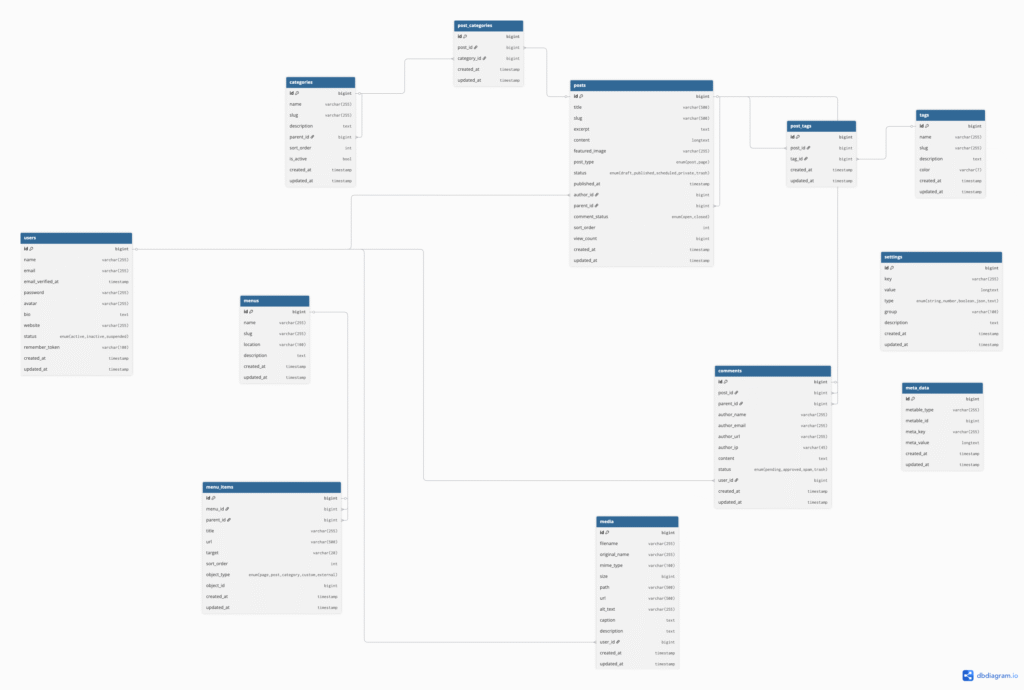
Above diagram does not show the schema related to settings and role and permission. For that we will be using an external plugin.
List of contents:
1. Laravel CMS Tutorial (Filament) | Part 1: Project Walkthrough & Demo
In this video we discuss about the database schema and the demo of the project of what we are going to create the system.
2. Laravel CMS Tutorial (Filament) | Part 2: Category Model & Localisation
In this video, we created category model, database as well as filament resource for category.
- Model and Database for category
- Filament resource for category
- Added one bulk action to toggle the status of category (Active,Inactive)
- Reorder feature for category
- Localisation Setup for navigation, fields, action and notifications.
3. Laravel CMS Tutorial (Filament) | Part 3: Manual Toggle For Localisation
The features of this video are:
- Created a livewire component for toggle.
- Use Render Hook to register the component. Click here to read more about render hook.
- Link for KENEPA Translation Manager plugin.
- Check our article on implementation of localisation plugin.
4. Laravel CMS Tutorial (Filament) | Part 4: POST Model, Migration and Resource
The features of this video are:
- Created a post model, migration and filament resource
- Used Enum in filament resource
- Read about enum in laravel and in filament.
5. Laravel CMS Tutorial (Filament) | Part 5: Advance Use of Enums, Page Resource
The features of this video are:
- Used enums label color
- Added filter action with enums
- Reorder and default sorting of table
- Build a page resource by extending post resource.
Github commit: Click here to see commit.
6. Laravel CMS Tutorial (Filament) | Part 6: Attach Category to post
The features of this video are:
- Explore belongToMany relationship.
- Use CheckboxList column to attach categories on posts.
Github commit: Click here to see commit.
7. Laravel CMS Tutorial (Filament) | Part 7: Send Laravel logs to discord
The features of this video are:
- Explore how we can send the error logs to discord channel. Click here to read step by step guidelines.
Github commit: Click here to see commit.
8. Seo Fields and Menu Migration
In this part, we will cover:
- Add seo fields to category and posts table
- Added menu and menu item migration
- Used filament dynamic settings plugin to handle settings.
For Organized form, seo fields. Click here to see github. and for settings package installation click here.
9. Menu and Menu Item
In this part, we will cover:
- Create a tree widget using a pacakge solution/filament-tree.
- Create custom form components for filament dynamic settings plugin.
10. Dynamic Menu Integration in filament
In this part, we will cover:
- Explore menu composers and share menu in our blade component.
- Dynamic menu integration.